 ultimate-guide
How to Check Home Automation System Compatibility
Last Updated: November 1, 2026
Quick Summary
Home automation compatibility is the ability of two or more smart devices to communicate, share commands, and expose their features through a shared controller or app without losing functionality. It depends on three layers: the wireless protocol, the ecosystem or hub, and the features each device exposes once connected. Check the official compatibility list for the exact model number before you buy.
- Wi-Fi devices connect directly to your router but dozens can crowd a home network.
- Zigbee and Z-Wave are low-power mesh networks that both need a hub or controller.
- Matter devices still need a controller that supports the standard, plus firmware updates or bridges for older devices.
- Unplug your router for ten minutes to see which devices keep working offline.
- Match the device's radio to your hub, not just the brand name.
Table of Contents
- Why Home Automation Compatibility Decides Your Setup
- Communication Protocols: Wi-Fi, Bluetooth, Zigbee, Z-Wave, and Thread
- Matter-Compatible Smart Home Devices and Their Real Limits
- Smart Home Hub Compatibility: Controllers, Ecosystems, and Local Control
- Zigbee and Z-Wave Compatibility: What Each Mesh Network Requires
- Smart Home Devices That Work Together: A Category-by-Category Matrix
- A Practical Compatibility-Check Workflow Before You Buy
- Step 1: Name your controller before you name the device
- Step 2: Check the official compatibility list, not the package
- Step 3: Confirm the protocol and the radio
- Step 4: Verify the specific feature, not just pairing
- Step 5: Check region, firmware, and app support
- Step 6: Run a return-window test
- Troubleshooting failed integrations
- Plan Your Compatible Smart Home with a Certified Electrician
- Frequently Asked Questions
Why Home Automation Compatibility Decides Your Setup
According to the Home Improvement Research Institute's 2026 smart home market analysis, about 7% of homeowners added smart-home capabilities during a home-improvement project completed in the first quarter of 2026. That is a small slice, and the reason is rarely the technology itself. Home automation system compatibility with smart devices is the bottleneck: a thermostat that speaks Wi-Fi, a lock that speaks Z-Wave, and a hub that speaks neither will not cooperate, no matter what the box promises.
What Compatibility Actually Means
Home automation compatibility is the ability of two or more smart devices to communicate, share commands, and expose their features through a shared controller or app without losing functionality. It is not the same as "works with Alexa" on a package label. True compatibility has three layers: the wireless protocol the devices speak, the ecosystem or hub that coordinates them, and the feature set each device exposes once connected.
Communication Protocols: Wi-Fi, Bluetooth, Zigbee, Z-Wave, and Thread
Each wireless standard solves a different problem, and mixing them without a plan is the fastest route to a dead-end system.
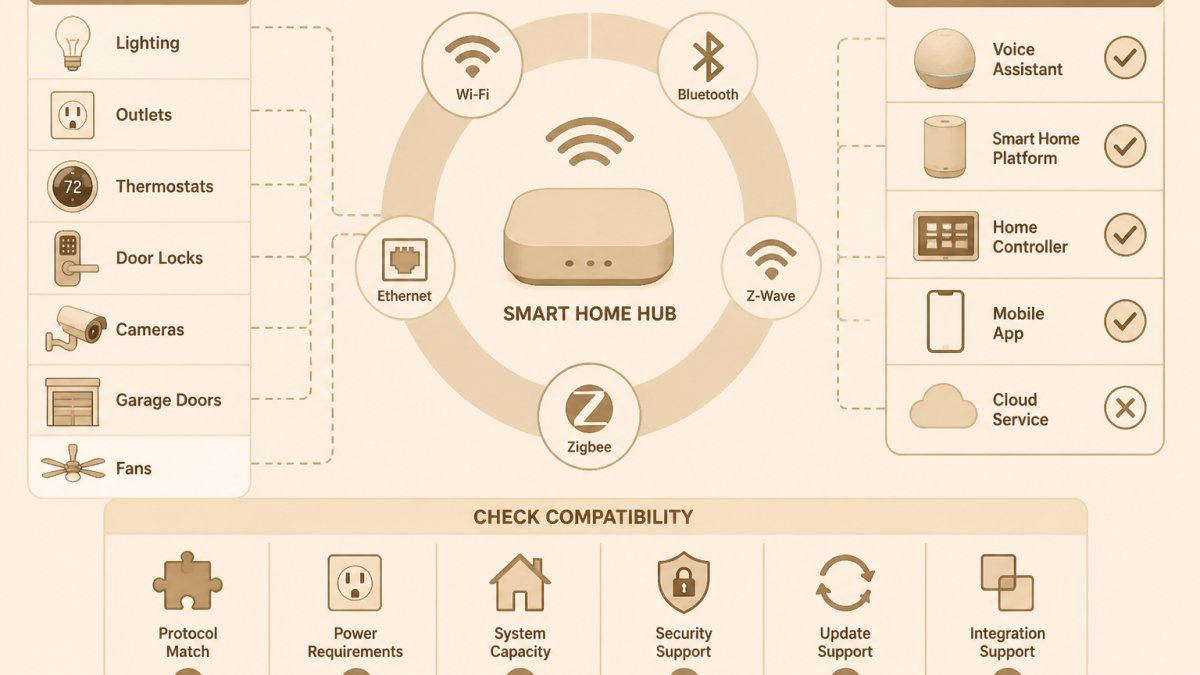
- Wi-Fi connects directly to your router. No hub needed, but dozens of Wi-Fi devices can crowd a home network.
- Bluetooth works for setup and short-range control, not whole-home automation.
- Zigbee and Z-Wave are low-power mesh networks. Both need a hub or controller, but they extend range as you add devices.
For a deeper look at how wired and wireless foundations compare, see our guide to wireless vs wired home automation. The practical takeaway: choose one mesh standard as your backbone, then treat Wi-Fi as the exception for high-bandwidth devices like cameras.
Matter-Compatible Smart Home Devices and Their Real Limits
Matter was supposed to end the format war. The Connectivity Standards Alliance's Matter overview states that Matter creates more connections between objects, simplifies development for manufacturers, and increases compatibility for consumers. That is real progress, but it is not a universal translator.
Matter-compatible smart home devices still depend on a controller that supports the standard, and older devices need firmware updates or bridges to join. A 2026 trends report from Strategic Market Research lists better interoperability as a force shaping the category, alongside more capable sensors and energy-management tools.
Smart Home Hub Compatibility: Controllers, Ecosystems, and Local Control
The hub is the decision that locks in everything else. Smart home hub compatibility determines which devices you can add, which apps you use, and whether your routines survive an internet outage. Most buyers treat the hub as an accessory; in practice it is the platform, and every later purchase is a bet on it.
The four hub models you will actually encounter
- Ecosystem-first hubs (Amazon Alexa, Google Home, Apple Home) are built around a voice assistant and a phone app. They are the easiest entry point and the broadest in device support, but deep automation often depends on the vendor's cloud and on which features the vendor chooses to expose.
- Protocol-first hubs (SmartThings, Hubitat, Home Assistant) are built around radios and local rules. They typically support Zigbee and Z-Wave, often Thread and Matter, and can run routines on the device itself. The trade-off is setup time and a steeper learning curve.
- Manufacturer hubs (for example, a lighting or security brand's own bridge) are the most reliable path for that brand's devices and the least flexible everywhere else. They are a good add-on, a poor foundation.
Local control is a feature, not a checkbox
Cloud-dependent hubs route commands through a server. They are easy to set up and fragile when the connection drops: a routine that turns on lights at sunset may simply not fire during an outage. Hubs with local control process routines on-site, so lights, locks, and scenes keep working offline.
A practical test before you commit: unplug your internet router for ten minutes and see what still works. Lights, locks, and sensors on a local hub should keep responding; cloud-only devices will not. Repeat the test after any major firmware update, because vendors occasionally move features between local and cloud execution.
What to verify before you buy a hub
- Radio support. Confirm the hub has the radios your devices use, Zigbee, Z-Wave, Thread, or Wi-Fi, not just the brand logos on the box.
- Matter controller role. A hub that is a Matter controller can commission Matter devices directly; a hub that is only a Matter bridge exposes its own devices to other ecosystems but cannot add third-party Matter devices.
- Local-routine coverage. Ask which automations run locally and which require the cloud. The answer is usually in the hub's documentation, not the marketing page.
- Update cadence. A hub with no firmware release in the past year is a liability, not a platform.
- Account and data model. Note whether the hub requires a vendor account, whether routines are stored in the cloud, and what happens to your devices if the vendor discontinues the product line.
A 2026 smart-home guide from SafeHome flags cybersecurity risk alongside the convenience and safety benefits, which matters when one hub holds every device credential in the house. When choosing a hub, look for local processing and regular firmware updates. If you are unsure which model fits your wiring and network, our guide to wireless vs wired home automation covers the infrastructure side.
Zigbee and Z-Wave Compatibility: What Each Mesh Network Requires
Zigbee and Z-Wave compatibility is not interchangeable, even though both are mesh networks. Each standard has its own radio, its own certification, and its own device catalog.
Zigbee devices from different manufacturers generally interoperate through a certified hub, but feature support varies. Z-Wave uses a stricter certification program, which tends to produce more predictable pairing across brands. Both need mains-powered devices to strengthen the mesh.
Get your free electrical estimate →
Smart Home Devices That Work Together: A Category-by-Category Matrix
The fastest way to check compatibility is to map device categories against your chosen ecosystem before you buy anything.
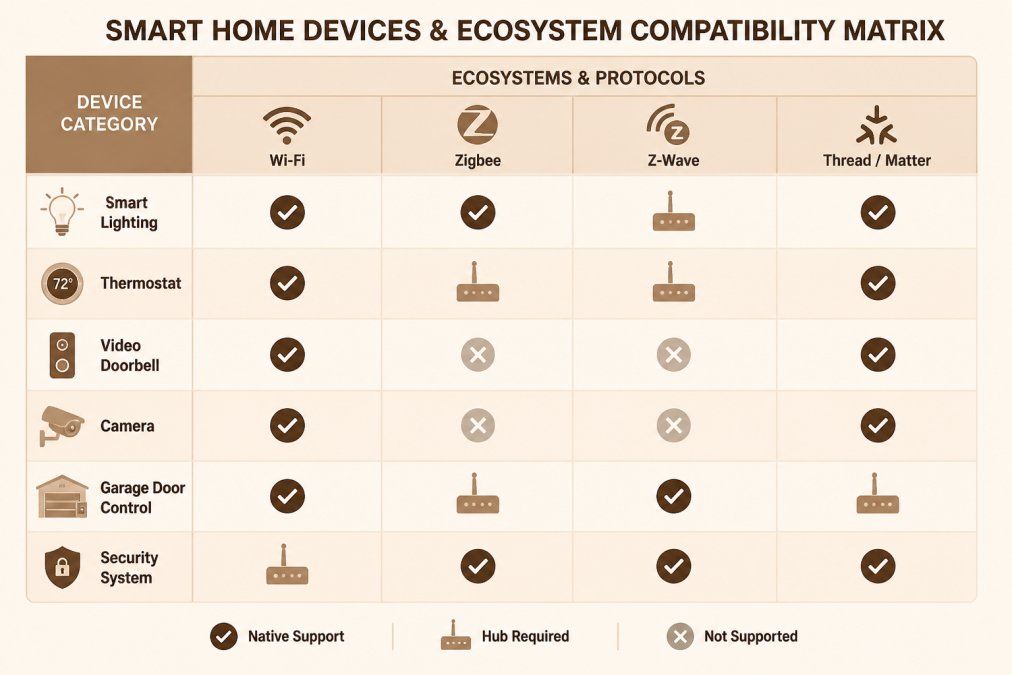
| Device Category | Wi-Fi | Zigbee | Z-Wave | Thread/Matter |
|---|---|---|---|---|
| Smart lighting | Native | Hub required | Hub required | Native with border router |
| Thermostat | Native | Hub required | Hub required | Native with border router |
| Video doorbell | Native | Rare | Rare | Limited |
| Camera | Native | Rare | Rare | Limited |
| Garage door control | Native | Hub required | Hub required | Emerging |
| Security system | Native | Hub required | Hub required | Emerging |
Two patterns stand out. Cameras and doorbells stay on Wi-Fi because they need bandwidth. Lighting and sensors thrive on mesh. For installation specifics on the lighting side, our guide to installing smart lighting covers wiring and fixture choices that fit a hub-based system.
A Practical Compatibility-Check Workflow Before You Buy
Most compatibility advice stops at "check the box." This workflow is the repeatable version: run it in order for every device you are considering, and you will catch the incompatibilities that packaging hides. It is built around the five things that actually break integrations, protocol, controller, app, region, and feature support.
Step 1: Name your controller before you name the device
Write down the hub or ecosystem you already own or plan to buy, including its exact model. "Alexa" is not a controller; an Echo Show is. "SmartThings" is not a controller; a SmartThings Station is. The model determines which radios are present and which Matter role the hub can play.
Step 2: Check the official compatibility list, not the package
Every major ecosystem publishes a compatibility list, and it is the only source that reflects current firmware. The package label is marketing and can lag the product by a year or more. Search the ecosystem's list for the exact model number, not the product family, manufacturers often ship the same product name with different radios in different SKUs.
Step 3: Confirm the protocol and the radio
Match the device's radio to your hub, not just the brand name. A Zigbee bulb will not join a Z-Wave hub, and a Wi-Fi device does not need a hub at all, but it also will not strengthen a mesh. For Matter devices, confirm whether your hub is a Matter controller or only a bridge; the distinction determines whether you can add the device at all.
Step 4: Verify the specific feature, not just pairing
Pairing is the easy part. The question is whether the routine you want survives the connection. Motion-triggered lighting, energy reporting, lock user codes, and camera event streams are the features most often lost when a device is bridged into a third-party ecosystem. Find the feature in the ecosystem's documentation or a recent user report before you buy; if you cannot confirm it, assume it is not supported.
Step 5: Check region, firmware, and app support
- Region. Some devices ship with region-locked radios or cloud accounts, and a device sold for one market may not commission in another. Confirm the SKU matches your market.
- Firmware. Look for a release in the past twelve months. A device with no recent updates is a discontinued product line in waiting.
- App support. Confirm the manufacturer's app is actively maintained and available on your phone platform; a dead app is a dead device.
Step 6: Run a return-window test
Buy from a retailer with a return window, install the device, and test the exact routine you bought it for within the first week. This is the only check that catches firmware-level surprises, and it costs nothing if the device works.
Troubleshooting failed integrations
When a device refuses to pair, work from the network outward. First, confirm the device is in pairing mode and within range of the hub or a mesh repeater. Second, check for a firmware mismatch; outdated hub firmware is a frequent culprit. Third, remove and re-add the device rather than retrying the same pairing. If your setup lacks a common wire, our walkthrough on wiring a smart thermostat without a C wire addresses it directly, and for older equipment, these thermostats for older HVAC systems are built to cooperate. A 2023 study indexed by ScienceDirect notes that smart grids and monitoring systems can enable real-time energy management, but only when devices actually communicate.
Plan Your Compatible Smart Home with a Certified Electrician
Compatibility is a wiring and planning problem as much as a software one. Neutral wires, dedicated circuits, and hub placement determine whether your system works reliably or limps along on workarounds. Light Life Electric is a family-owned, Florida certified electrical contractor, licensed, bonded, and insured, and we handle projects from permits to final inspection. Get your free electrical estimate from Light Life Electric. Contact our team to schedule your assessment.
Frequently Asked Questions
How do I know if a smart device is compatible with my home automation system?
Check three things before buying: the wireless protocol the device uses (Wi-Fi, Zigbee, Z-Wave, Bluetooth, or Thread), whether your hub or app lists the device as supported, and whether the specific features you want are exposed through that integration. A device can pair successfully yet offer only limited functionality, such as on/off control without energy monitoring. Manufacturer compatibility lists and the Connectivity Standards Alliance's Matter product database are the fastest places to confirm support.
Does Matter make smart home devices compatible with every platform?
No. Matter is a shared communication standard that increases compatibility, but it does not guarantee every feature works on every platform. The Connectivity Standards Alliance describes Matter as simplifying development and improving consumer compatibility, not as universal support. Some manufacturers implement only the core device types, and advanced features may stay behind a brand's own app. Verify the exact device type and feature set against your hub's Matter support list before purchase.
Do I need a hub to connect smart home devices?
It depends on the protocol. Wi-Fi devices usually connect directly to your router and are controlled through the manufacturer's app or a cloud service. Zigbee, Z-Wave, and Thread devices need a hub or border router to join the network. Many households end up with one primary hub plus a few brand-specific bridges, which is why smart home hub compatibility matters as much as device choice. Local control through a hub also keeps routines running when the internet is down.
How can I fix a smart device that will not connect to my home automation system?
Work through the basics in order: confirm the device is powered and within network range, check for firmware updates on both the device and the hub, and re-run pairing in discovery mode. For Zigbee and Z-Wave, add a repeater or move the device closer to a mains-powered node. If the device pairs but shows limited functionality, the integration likely supports only a subset of features. A licensed electrician can also verify that wiring, box depth, and neutral wires meet the device's requirements.
The gap between a smart home that works and one that fights you is usually a compatibility decision made too late. Let Light Life Electric plan the wiring and device strategy before you buy, with code-compliant installation, permit-to-inspection project handling, and 24/7 emergency response behind it. Get started with Light Life Electric and build a connected home that actually cooperates.