 blog
blog
Wireless vs Wired Home Automation: Pros and Cons
Table of Contents
- Wireless vs Wired Home Automation: Key Differences at a Glance
- Wired Home Automation Pros and Cons
- Wireless Home Automation Pros and Cons
- Hybrid Home Automation System: The Best of Both Worlds
- Home Automation Wiring for New Construction
- Room-by-Room Decision Framework
- Total Cost of Ownership and Long-Term Maintenance
- Conclusion
- Frequently Asked Questions
Last Updated: October 12, 2026
Wireless vs Wired Home Automation: Key Differences at a Glance
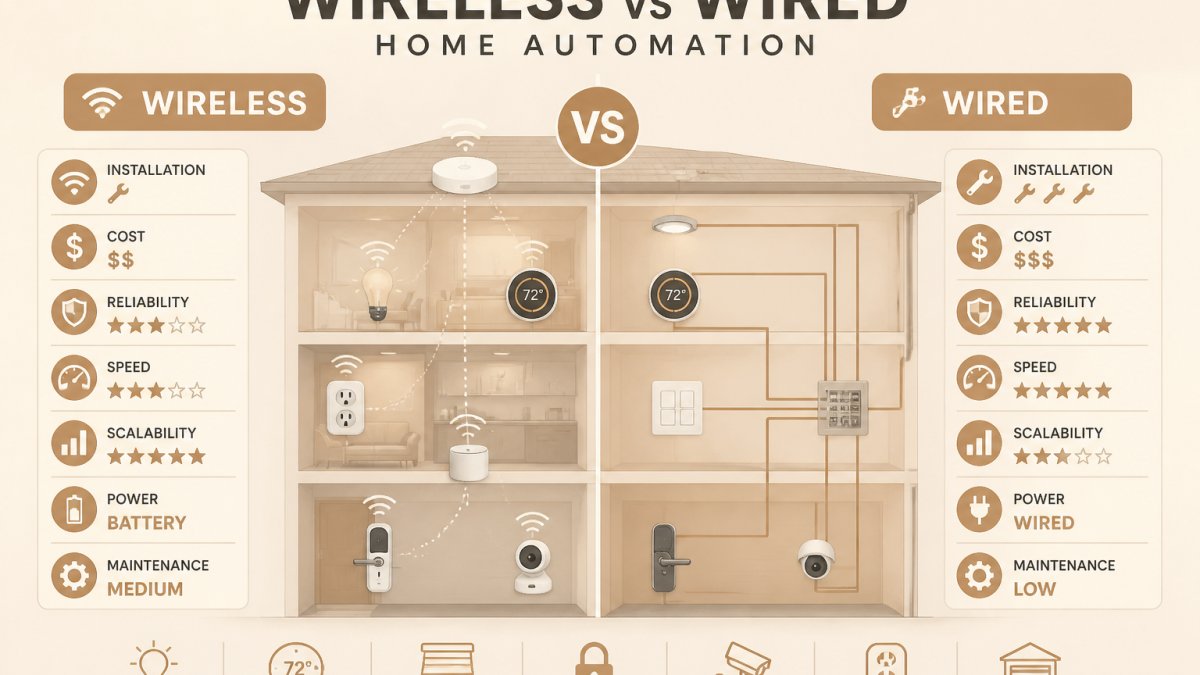
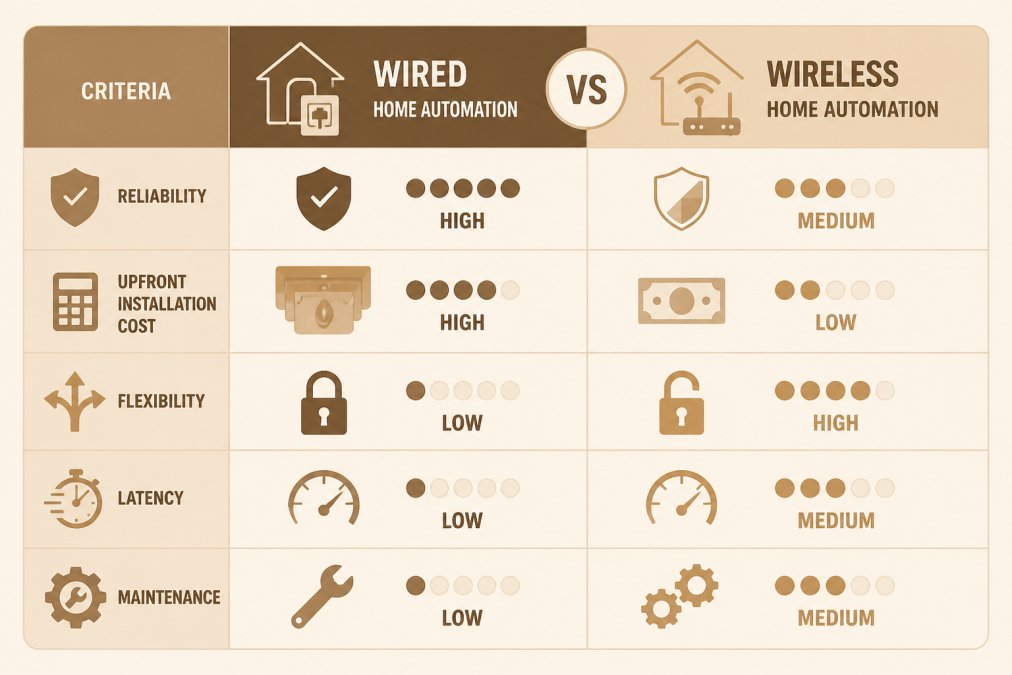
Choosing between wireless vs wired home automation pros and cons comes down to one trade-off: wired systems deliver rock-solid reliability at high upfront cost, while wireless systems install fast and flex with your needs but answer to interference and battery life.
Home automation is the use of connected devices, sensors, and controllers to manage lighting, security, climate, and entertainment from a single interface. The backbone carrying those signals, cabling or radio frequency, determines how the system performs for the next decade.
The short version:
- Wired systems (Ethernet, or dedicated bus protocols) win on stability, speed, and security.
- Wireless systems (Wi-Fi, Zigbee, Z-Wave) win on installation speed, cost, and flexibility.
- Hybrid designs usually beat both pure approaches in real homes.
Comparison Table: Reliability, Cost, and Installation
| Factor | Wired System | Wireless System |
|---|---|---|
| Reliability | Very high, no interference | Good, can drop signals |
| Upfront cost | High (cable, labor, walls) | Low to moderate |
| Installation | Invasive, best in new builds | Fast, retrofit-friendly |
| Flexibility | Low, fixed points | High, move devices freely |
| Latency | Very low | Low to moderate |
| Maintenance | Minimal | Batteries, firmware, resets |
| Best for | New construction, critical systems | Retrofits, renters, quick upgrades |
Wired Home Automation Pros and Cons
Wired home automation pros and cons start with the obvious: a physical cable does not care about your neighbor's router, a microwave, or a thick plaster wall. Signals travel on copper and arrive every time.
The catch is that copper has to go somewhere. Every switch, sensor, and speaker needs a cable run, which means opening walls, pulling conduit, and patching drywall.
Where Wired Systems Win: Stability and Speed
Stability is the headline. A wired home automation network carries commands over shielded cable or Ethernet, so there is no RF interference, no dropped packets, and no "why did the lights not respond" moments.
Security is the second win. A hardwired network does not broadcast commands through the air, so there is less surface area for interference or unauthorized access.
Where Wired Systems Struggle: Cost and Retrofitting
The honest downside is disruption and cost. Running cable through a finished home means cutting drywall, drilling studs, and paying for skilled labor on every run. In a retrofit, that labor often costs more than the hardware itself.
Flexibility is the other limitation. Once a cable is in the wall, that device lives there. Moving a wall-mounted touch panel or adding a sensor to a new corner means another cable run.
Wireless Home Automation Pros and Cons
Wireless home automation pros and cons flip the equation: you trade a little reliability for a lot of convenience. Devices talk over Wi-Fi, Zigbee, Z-Wave, or similar radio frequency protocols, so there is no cable to pull and no wall to open, often the difference between starting a smart home this month and putting it off for years. The trade-off shows up in signal strength, interference, and battery-powered maintenance.
Wireless Advantages: Flexibility and Easy Installation
Installation is the strongest argument. A wireless smart device typically pairs with a hub or your router in minutes, and you can move it to a new room without calling anyone, ideal for renters, rooms where you are still figuring out the layout, and anyone testing a setup before committing.
Wireless also scales cheaply. Adding a smart plug or motion sensor costs a fraction of a wired run, and you can expand one device at a time as your budget allows. For lighting control, security cameras, and voice assistants, the wireless ecosystem is mature and easy to shop for.
Wireless Drawbacks: Interference and Reliability
Interference is the real weakness. Wi-Fi, Zigbee, and Z-Wave all share crowded radio frequency bands, and signal strength drops through concrete, metal, and even dense furniture.
Reliability also depends on your internet connection and power.
Hybrid Home Automation System: The Best of Both Worlds
A hybrid home automation system combines a wired backbone for critical systems with wireless devices for everything else. In practice, Ethernet or a dedicated bus protocol handles lighting control, security, and HVAC, while Wi-Fi and Zigbee cover sensors, speakers, and app-based control.
This is the design we recommend most often. You get the stability of cable where failure is unacceptable and the flexibility of wireless where convenience matters more than perfection.
Get your free electrical estimate →
Home Automation Wiring for New Construction
Home automation wiring for new construction is the one moment when wired wins on cost as well as performance. When the walls are open, running cable is a fraction of the labor it costs in a finished home, and you can plan conduit for devices you have not bought yet.
If you are building or doing a major renovation, wire more than you need. Run Ethernet to likely camera and access point locations, pull cable for lighting keypads, and leave conduit to the panel for future upgrades.
Room-by-Room Decision Framework
No single system fits every room, and the fastest way to get this wrong is to pick one connection type for the whole house. Decide device by device, then let the pattern emerge. The rule of thumb: wire anything you never want to fail, and go wireless anywhere you value flexibility more than certainty.
Lighting
- Wired: Keypads, scene controllers, and permanent recessed or architectural lighting. A wired keypad keeps working when the router is down, and dimming is smooth and instant across dozens of fixtures.
- Wireless: Lamps, plug-in fixtures, and rooms you may rearrange. Smart bulbs and smart plugs are the cheapest way to test a lighting scene before committing to a keypad.
- Why it matters: Lighting is the highest-frequency command in most homes. If your lights lag, the whole system feels broken, so this is where wired earns its keep.
Sensors (motion, door/window, temperature, leak)
- Wireless: Almost always. Sensors are cheap, battery-powered, and placed where you need them, including inside cabinets and behind furniture. Zigbee and Z-Wave sensors report reliably at short range and are trivial to relocate.
- Wired: Only for permanent, hard-to-reach locations or commercial-grade security zones where battery replacement is impractical.
- Why it matters: Sensors are the eyes of the system. Their value comes from coverage, not speed, so flexibility wins.
Locks and Entry
- Wired: Preferred for the primary entry and any door tied to an alarm panel. A wired lock or strike plate works during a power outage with battery backup and cannot be jammed by RF interference.
- Wireless: Fine for secondary doors, garage entry, and rentals where you cannot modify the door. Choose a model with a physical key override and local (non-cloud) code storage.
- Why it matters: A lock that fails open is a security problem, not a convenience problem.
Cameras
- Wired (PoE): The default for exterior and perimeter cameras. Power over Ethernet delivers power and data on one cable, so there is no battery to swap and no Wi-Fi dead zone to fight. Recording stays local on an NVR.
- Wireless: Acceptable for indoor cameras, doorbells, and temporary coverage. Expect to recharge or replace batteries, and expect the feed to depend on your router and internet connection.
- Why it matters: Cameras are the device most likely to be pointed at a spot with weak Wi-Fi, which is exactly where wireless fails.
Thermostats and HVAC
- Wired: The thermostat itself is already wired for power and control in most homes, so this is a natural wired zone. Zoned HVAC dampers and equipment controls belong on a wired bus.
- Wireless: Remote temperature and humidity sensors placed in bedrooms and basements, which feed the thermostat without running new cable.
- Why it matters: HVAC is slow to respond, so latency is not the issue, reliability and sensor placement are.
Entertainment and Speakers
- Wired: In-wall and in-ceiling speakers, AV receivers, and any device that streams high-bandwidth audio or video. Ethernet to a media cabinet avoids buffering.
- Wireless: Portable speakers, soundbars, and streaming sticks where the device may move or be replaced.
- Why it matters: Bandwidth-heavy devices compete for Wi-Fi airtime with everything else in the house.
A Quick Decision Test
Ask three questions for each device:
- Does it need to work when the internet is down? If yes, wire it or choose a local-control wireless protocol.
- Will it move or be replaced within a few years? If yes, wireless.
- Is it in a spot with weak signal or thick walls? If yes, wire it or add a wired access point nearby.
Total Cost of Ownership and Long-Term Maintenance
Most comparisons stop at the installation invoice. That is the wrong number. The real question is what each system costs to own, operate, and eventually replace over the life of the home.
Upfront Cost: Where the Money Goes
- Wired: The hardware is often the smaller line item. The bulk is labor, running cable, cutting and patching drywall, drilling studs, terminating at a panel, and testing. In a finished home, drywall repair alone can rival the cost of the cable. In new construction, that labor largely disappears because the walls are already open.
- Wireless: You pay per device, and again for a hub if you use Zigbee, Z-Wave, or Thread. There is no cabling labor, but you may pay for a mesh access point or two if the home is large or the walls are dense.
Ongoing Cost: The Part People Forget
- Batteries: This is the quiet budget killer in wireless systems. Sensors, locks, doorbells, and buttons each run on batteries, and each has its own cadence, some last a year, some last several, and cold weather shortens life. Multiply by the number of devices and the years you plan to stay.
- Firmware and app churn: Wireless devices depend on hubs, apps, and cloud services. When a manufacturer discontinues a hub or changes an app, you may be forced to replace working hardware. Wired bus systems tend to have longer product lifecycles because the protocol is stable.
- Resets and troubleshooting: Wireless systems generate small, recurring time costs, re-pairing a device, rebooting a hub, re-adding a sensor after a battery swap. It is not a bill, but it is real.
Repair and Replacement
- Wired: A damaged cable is a project, locate the fault, open the wall, repair, patch, repaint. A failed device is usually a straightforward swap at the same location.
- Wireless: A failed device is a swap, but the replacement may not be compatible with your existing hub or protocol, which can cascade into replacing more than one device.
Longevity and Standards Risk
Wired infrastructure, cable, conduit, and a panel, is largely protocol-agnostic. The copper does not care whether the devices on the end speak Ethernet, a lighting bus, or something that does not exist yet, so the expensive part of a wired system can outlive several generations of devices.
Wireless hardware ages faster. Radio standards and hub ecosystems evolve, and a device that works today may be orphaned in five years if its manufacturer exits the category or drops support.
A Simple Way to Compare
Estimate three numbers for each approach:
- Installation: cable, labor, and drywall for wired; devices and hubs for wireless.
- Annual operating: batteries, subscriptions, and time spent on resets for wireless; near zero for wired.
- Replacement horizon: how many years before the hardware or its ecosystem forces an upgrade.
For a home you plan to keep for decades, wired usually wins on lifetime cost because the infrastructure is paid for once. For a home you may sell or rent within a few years, wireless is the smarter financial call because you are not paying for permanent infrastructure you will not enjoy.
Conclusion
The real challenge is not picking a side, it is matching the connection type to your home, your walls, and your plans.
As a family-owned, Florida certified electrical contractor, we are licensed, bonded, and insured, and we manage the entire process from permits to final inspection. We also offer 24/7 emergency response when something goes wrong at the worst possible time.
Get your free electrical estimate from Light Life Electric.
Frequently Asked Questions
Which automation is best, wired or wireless?
There is no single best option. Wired home automation excels in reliability and speed, making it ideal for new construction or major renovations where cables can be run. Wireless home automation offers easier installation and flexibility, suiting existing homes and renters. Many homeowners choose a hybrid system: wired for critical devices like security and lighting control, wireless for sensors and smart devices that may move.
Is wireless home automation easier to install in an existing home?
Yes, wireless systems typically require far less disruption because they avoid running physical cabling through walls. Installation often involves mounting devices and connecting to your Wi-Fi or a hub. However, signal strength and interference can affect performance. A professional can assess your home's layout to ensure reliable coverage.
Can wired and wireless home automation work together?
Yes, a hybrid home automation system combines both. You might use wired Ethernet for a central controller and security cameras, while wireless sensors and smart lights handle other areas. This approach balances reliability with flexibility. A qualified electrician can design a hybrid setup that fits your home's structure and your budget.
Which home automation system is easier to expand?
Wireless systems are generally easier to expand because you can add devices without running new cables. Wired systems can also be expanded, but it often requires access to walls or conduits. If you plan to add many devices over time, wireless may be more convenient. For new construction, installing extra wiring now can make future expansions simpler.