 how-to
Preventing Power Surge Damage: A Step-by-Step Guide
Last Updated: October 29, 2026
Quick Summary
Power surge damage is prevented with layered protection: a surge protective device at the main electrical panel, point-of-use protectors on sensitive equipment, and protection on internet, cable, and phone lines. Surge protection reduces losses from power surge damage but cannot eliminate them entirely.
- Install a whole-building surge protective device at or near the main electrical panel, ideally through a licensed electrician.
- Add point-of-use protectors between outlets and sensitive equipment like computers and home theater gear.
- Protect internet, cable TV, and telephone lines, since surges can enter through these paths and bypass power protectors.
- Check status indicators on protectors regularly and replace any device that shows it has failed.
- Replace a surge protector after it absorbs a serious hit, because it may no longer protect fully.
Table of Contents
- What a Power Surge Does to Electrical Equipment
- Power Surge Causes and Prevention: Finding the Sources
- How Surge Protective Devices Work and How to Compare Their Ratings
- Building a Layered Plan: From the Service Panel to Each Device
- Surge Protective Device Installation at the Panel
- Inspection, Status Indicators, and When to Replace
- Booking a Surge Protection Review for Your Property
- Frequently Asked Questions
Power surge damage is one of the quieter threats to electrical equipment in a home or business. A single spike can damage a computer, a television, or a commercial control panel in a fraction of a second, and the damage often does not show up until later. This step-by-step guide explains the risk and ways to protect your equipment. Surge protection is a layered job, and the right approach starts with knowing where surges come from.
A surge protective device, or SPD, is the core tool here. According to Electrical Safety Foundation International guidance on surge protective devices, surge protection devices are designed to limit the excess voltage that can reach connected equipment. Surge protection can reduce losses from power surge damage, but it cannot eliminate them entirely, and that limitation matters for setting realistic expectations.
What a Power Surge Does to Electrical Equipment
A power surge is a brief jump in voltage above the normal level flowing through your wiring. These spikes last only milliseconds, but they carry enough energy to break down the internal circuits of sensitive electronics.
Not every surge causes serious harm. Equipment is built to handle some overvoltage, and Envista Forensics analysis of power surge and lightning damage notes that many surges are too short or too weak to do much damage. The danger comes from the larger spikes, which can destroy components outright or weaken them so they fail months later.
Common signs of surge damage include:
- Devices that won't turn on after a storm
- Flickering lights or appliances that suddenly stop working
- Electronics that reset, freeze, or behave strangely
- A burnt smell or discolored outlets
Power Surge Causes and Prevention: Finding the Sources
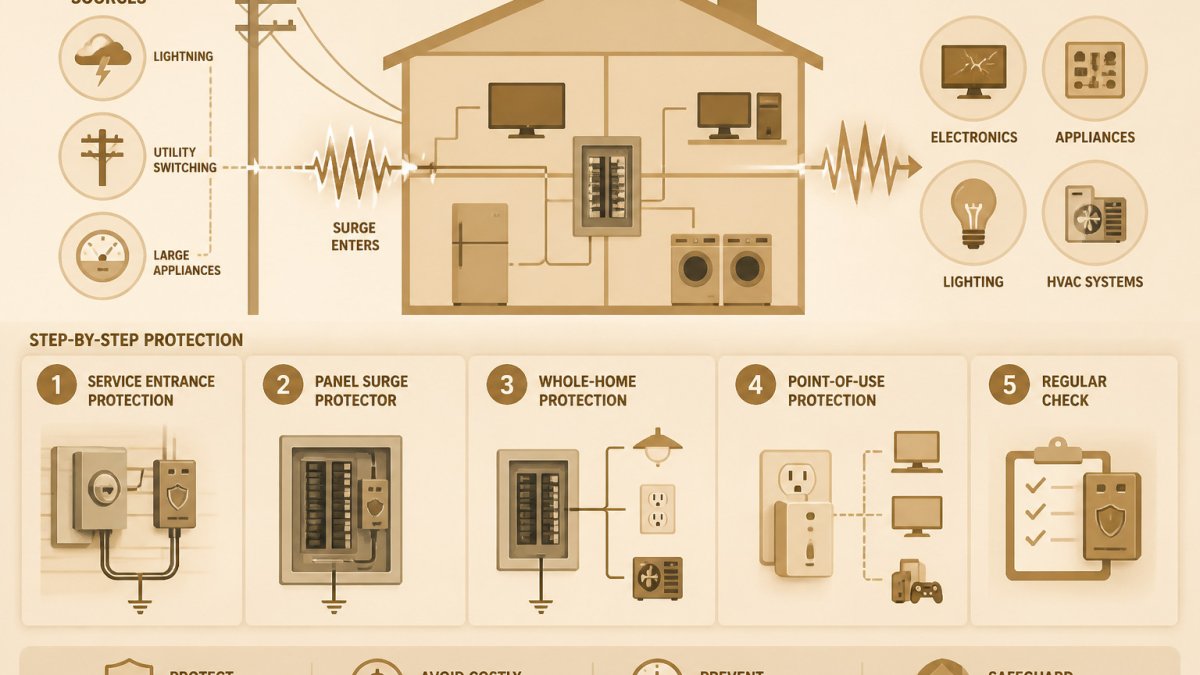
Knowing where surges come from helps you pick the right protection. Surges come from outside the building and from inside it.
- Lightning strikes near power lines can send huge spikes into the wiring
- Utility switching when the grid reroutes power can cause brief surges
- Large equipment cycling on and off, like air conditioners and compressors, can create spikes inside the building
- Heavy loads that overload a circuit can contribute to voltage instability
Prevention starts with reducing the most common sources. Keep sensitive electronics off overloaded outlets, and have an electrician check any circuit that trips often. Unplugging equipment during a storm is a simple step, but it only works if you actually do it.
How Surge Protective Devices Work and How to Compare Their Ratings
Surge protectors work by diverting excess voltage away from your equipment, usually to the ground wire. They do not block the surge; they redirect it. Inside the device, a component called a metal oxide varistor (MOV) changes resistance as voltage rises, at normal voltage it sits nearly inert, and when voltage climbs past its threshold it conducts the excess to ground. That threshold and the device's capacity to absorb energy are what the ratings on the box describe.
When you compare products, look at these specifications together, not in isolation:
| Rating | What It Tells You | What to Look For |
|---|---|---|
| Clamping voltage | The voltage level at which the device starts diverting excess voltage | Lower is better, a lower clamp means less excess voltage reaches your equipment |
| Joule rating | Total energy the device can absorb over its life | Higher is better, but only meaningful alongside a real surge-current rating |
| Surge-current capacity | Peak current the device can divert in a single event, often given in amps or kA | Higher for service-panel devices and for areas with frequent storms |
| Response time | How fast the device reacts once voltage exceeds its threshold | Faster is better; MOV-based devices respond in nanoseconds |
| Safety certification | Independent testing to a recognized standard | A listing mark from a recognized testing laboratory |
| Status indicator | Shows whether protection is still working | A visible light, audible alarm, or both |
A few practical rules of thumb help you read that table correctly:
- Clamping voltage and joule rating work together. A device with a very low clamping voltage but a tiny joule rating may clamp well on small spikes and fail early on larger ones. A device with a huge joule rating but a high clamping voltage lets more excess voltage through before it reacts. You want both a low clamp and adequate energy absorption.
- Joule ratings are not standardized across brands. One manufacturer's joule number is not directly comparable to another's, because test conditions and definitions vary. Treat the joule rating as a rough indicator and lean on surge-current capacity and certification for a firmer comparison.
- Match the device to the load. A computer, router, and television have different tolerances than a motor or a commercial control panel. For sensitive electronics, prioritize low clamping voltage. For service-panel protection, prioritize surge-current capacity and a robust grounding path.
- Certification is not optional. Look for a listing mark from a recognized testing laboratory. An uncertified power strip with an impressive joule number is not a substitute for a tested surge protective device.
Don't rely on the joule rating alone. A high number on a cheap power strip can still hide poor protection circuitry, and a low clamping voltage on an uncertified device tells you little about how it will behave in a real event.
Building a Layered Plan: From the Service Panel to Each Device
The most effective protection uses layers, and each layer has a distinct job. Understanding what each one does, and does not, protect is what turns a list of devices into a coordinated plan.
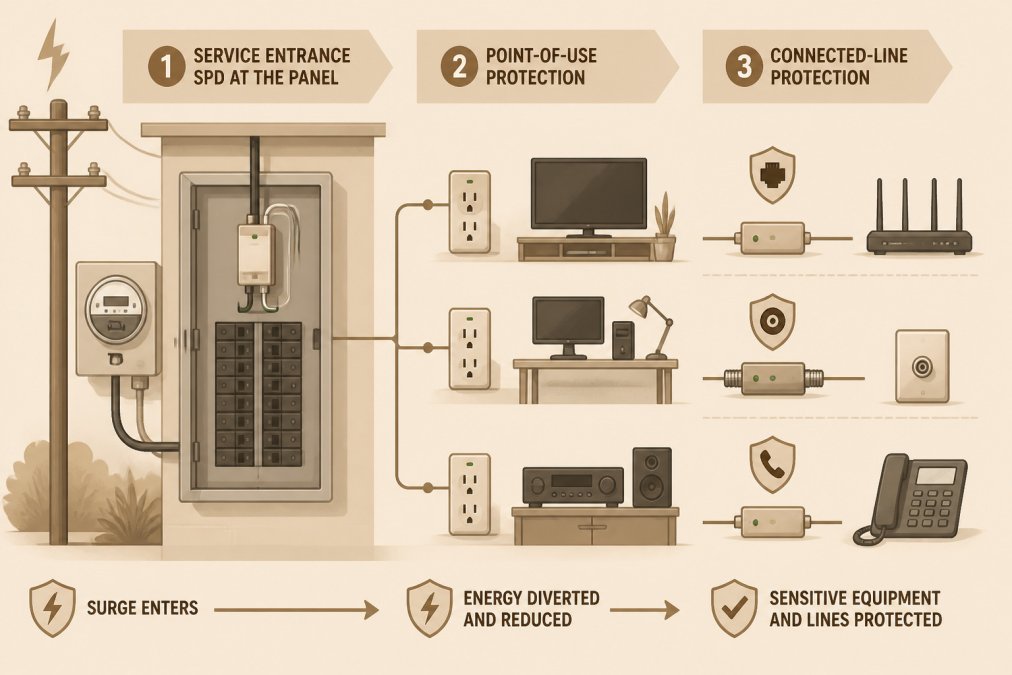
Layer 1: The whole-building surge protective device at the service panel. This device is wired at or near the main electrical panel and diverts large surges before they spread through the building's wiring. It protects every circuit downstream, including hardwired equipment like HVAC systems, well pumps, and commercial control panels that you cannot easily plug into a point-of-use protector. What it does not do is eliminate every spike: by the time a surge reaches a distant outlet, some excess voltage can remain, and it offers no protection for surges that enter through data, coaxial, or telephone lines.
Get your free electrical estimate →
Layer 2: Point-of-use protectors at sensitive equipment. These devices sit between the outlet and the equipment, computers, home theater gear, office systems, medical or lab equipment. They catch the residual spikes that the panel device lets through and respond faster to surges generated inside the building by nearby equipment cycling on and off. What they do not do is protect equipment on other circuits, and they cannot absorb the energy of a large incoming surge on their own.
Layer 3: Signal-line protection for connected equipment. Power is not the only path a surge can take. Internet cables, cable TV coaxial lines, and telephone lines can all carry surges into your equipment, and a protector on the power outlet will not stop a spike that travels through an internet modem. Make sure any line that connects to a modem, router, or receiver has its own protection. This is one of the most overlooked gaps in a home or business surge plan.
The layers complement each other because they address different surge paths and different energy levels. A panel device alone leaves connected-line and residual-spike risks; point-of-use protectors alone leave hardwired equipment and large incoming surges exposed; signal-line protection alone leaves power surges unaddressed. Used together, they reduce the chance that any single path carries a damaging spike to your equipment.
Watch out: a surge protector plugged into an overloaded outlet can overheat. Keep the load below the device's rating, and do not daisy-chain power strips. To judge whether the added expense of layered protection is justified for a business, read whether commercial surge protection is worth the cost.
Surge Protective Device Installation at the Panel
A whole-building SPD is installed at or near the main electrical panel. This is work for a licensed electrician, not a weekend project. The device has to be wired correctly and connected to a proper ground.
Before installation, your electrician should check the panel's capacity and confirm the grounding is sound. A good installation protects every circuit in the building, which is why it forms the foundation of the layered plan.
Inspection, Status Indicators, and When to Replace
Surge protectors wear out. Each surge they absorb takes a little life from the device, and eventually the protection stops working even though the device still powers your equipment.
- Check the status light on point-of-use devices regularly
- Replace the device when the indicator shows it has failed
- Replace after a major storm if you are unsure of its condition
- Have the panel-level SPD inspected during routine electrical checks
If a surge protector has absorbed a serious hit, assume it may no longer work fully. Replacing it costs far less than replacing the equipment it failed to protect.
Booking a Surge Protection Review for Your Property
Protecting equipment is easier with a professional assessment.
When you're ready to talk through your options, reach out to our team for a consultation.
Protecting your equipment from power surges takes a plan, not a single gadget. Start at the panel, protect the devices that matter most, cover your connected lines, and keep an eye on the status indicators.
Frequently Asked Questions
What causes power surges in commercial buildings?
Surges come from two main sources. External sources include lightning and utility switching, which can send voltage spikes through service lines. Internal sources include equipment inside buildings, such as contactors, relays, breakers, and capacitor banks that switch large loads. Because internal surges are frequent, a commercial property should not rely only on utility-side protection. Identifying high-cycling equipment helps decide where protection matters most.
Are power strips enough to protect commercial equipment from surges?
Usually not. A basic power strip without a surge protective rating does nothing to divert excess voltage. Even a rated surge protector only handles a limited surge energy, measured in joules, and it wears out after absorbing surges. For commercial equipment, a point-of-use surge protector is a useful final layer, but it works best alongside a surge protective device installed at the electrical panel. Check each device's stated joule rating and clamping voltage before relying on it.
What is the difference between a surge protector and a whole-building surge protective device?
A point-of-use surge protector plugs into an outlet and protects specific equipment. A whole-building surge protective device, or SPD, is installed at the service panel and limits surges before they spread through the electrical system. The panel-mounted device handles larger surges that point-of-use units cannot absorb alone. Most surge protection plans use both: the panel SPD for broad protection and point-of-use devices for sensitive electronics.
How often should surge protective devices be inspected or replaced?
Inspect surge protective devices on a regular schedule and check status indicators on each unit. Many SPDs have a light or indicator that shows whether protection is still active. Replace a device when its indicator shows it has reached end of life, when it has visible damage, or after a major surge event that may have degraded its components. Maintaining a record of inspections and replacements helps property managers budget for ongoing maintenance.